Skip to content
3 days freeTry Lomar with 6 free images

Meet Lomar, your AI art director.

Lomar is an AI creative studio and social media planner. On-brand social ads, AI product photography and editorial campaigns with the cast you choose, then scheduled and published from one social media planner.

Create social ads
  • 6 images free
  • 3 days to try
  • Cancel before day 3, pay nothing

Trusted by 100+ creators and designers

Lomar, the Lomar mascot, peeking over the screen
Read the transcript

Hi! I'm Lomar. And this is my studio. Let's scan your brand: your design, your brand guide. Then I make posts for your product or brand. One product photo? I shoot it in the studio, or on set, with a model. Campaigns: I scout one location and shoot four frames. Book a model, they're in every shot. Ad Radar finds the ads that keep running in your category. Pick one, I rebuild it from your Brand Kit. A whole collection? Add the pieces, and I shoot the lookbook. Then plan it, and post it, right from the calendar. You bring the product. I bring the eye. Start free at lomar.ai, or download the app on the App Store.

How it works

From product to campaign—art-directed.

Lomar turns it into finished creative without prompt engineering, design templates, or a long brief. Start with a photo, a Library asset, or a product link.

  1. 01Clay illustration: a product link turning into brand colour and shape cards

    Bring your product and brand

    Upload a product photo, choose an asset from your Library, or paste a shop URL. Brand DNA keeps every result visually consistent.

  2. 02Clay illustration: a studio set with a camera, a lamp, a product bottle and colour swatches

    Autonomous art direction

    The engine pairs your product with location scouting, architectural lighting, and editorial composition. No template. No brief to fill in. For an editorial campaign, Lomar scouts one location and starts with 4 frames by default, sharing the creative direction and booked model.

  3. 03Clay illustration: an image tile connected to a brief and a finished result

    Choose cast and format

    Book a model, choose the human presence, and select feed, square, or story. The campaign is composed for the placement from the start. The cast has 46 faces on permanent call, so you can keep the same model across product shots and campaigns.

  4. 04Clay illustration: a stack of finished campaign frames ready to publish

    Translate, plan, and publish

    Planner supports the 5 networks shown below. Localize finished visuals, add them to your social calendar, and publish approved posts to connected accounts from one workflow.

  • AutomationProduct assets and Brand DNA become complete, location-scouted campaigns. No manual compositing.
  • SimplicityNo prompt engineering, brief templates, or layering by hand. Art direction is built into the workflow.
  • SpeedLookbooks, studio frames, and ads in seconds, on web and on iPhone.
  • AccessibilityStudio polish a team of any size can actually ship, at a price built for mass-market use.

Lookbook

Turn your product catalogue into a lookbook.

Upload a front photo of each garment, group them into looks, and choose the model, backdrop and light once. Lomar shoots every look the same way, so the whole collection holds together. A collection supports up to 200 pieces and 200 looks, with 1 to 5 garments per look.

  • Up to 200 pieces and 200 looks per collection, with 1 to 5 garments in each look.
  • Front, three-quarter and back views. Back views use the back photos you upload.
  • Review the first looks, approve the direction, then run the rest of the collection.
  • Export approved images as a ZIP with an article CSV, or as an A4 PDF catalogue.

Available on Creator, Pro and Business.

Open Lookbook
Lookbook result: one model in a suit, shown from the front, side and back, plus two more colourways

Ad Radar

Find the ads that keep running in your category.

Paste your website. Ad Radar reads your offer, finds matching image ads on Meta and ranks them with a research signal. Pick one and Lomar builds your own version from your Brand Kit. The signal ranges from 0 to 100, using fit, run time, live variants and a nameable principle.

Open Ad Radar
Ad Radar reference ads, each with a fit label and a Radar signal score
Radar signal card: fit, runtime, variants and principle, scored in points

Ad references use data from the Meta Ad Library. The Radar signal is a research signal, not a sales forecast. Budget, clicks and sales are not public on Meta, so Lomar never shows them.

Reference ad found by Ad Radar
Reference
Ad made by Lomar from the reference, in the brand's own style
Your ad, made from the reference
01ScanPaste your website. Lomar reads your offer and category in four steps.
02MatchStatic Meta image ads for similar products and needs, labelled by how directly they fit.
03SignalA score from 0 to 100 built from fit, run time, live variants and a nameable principle.
04CreatePick a reference and Lomar makes your ad from your Brand Kit. Its layout, colours, words and people are not copied.

Workspace Pro

Node workflows for the whole shoot.

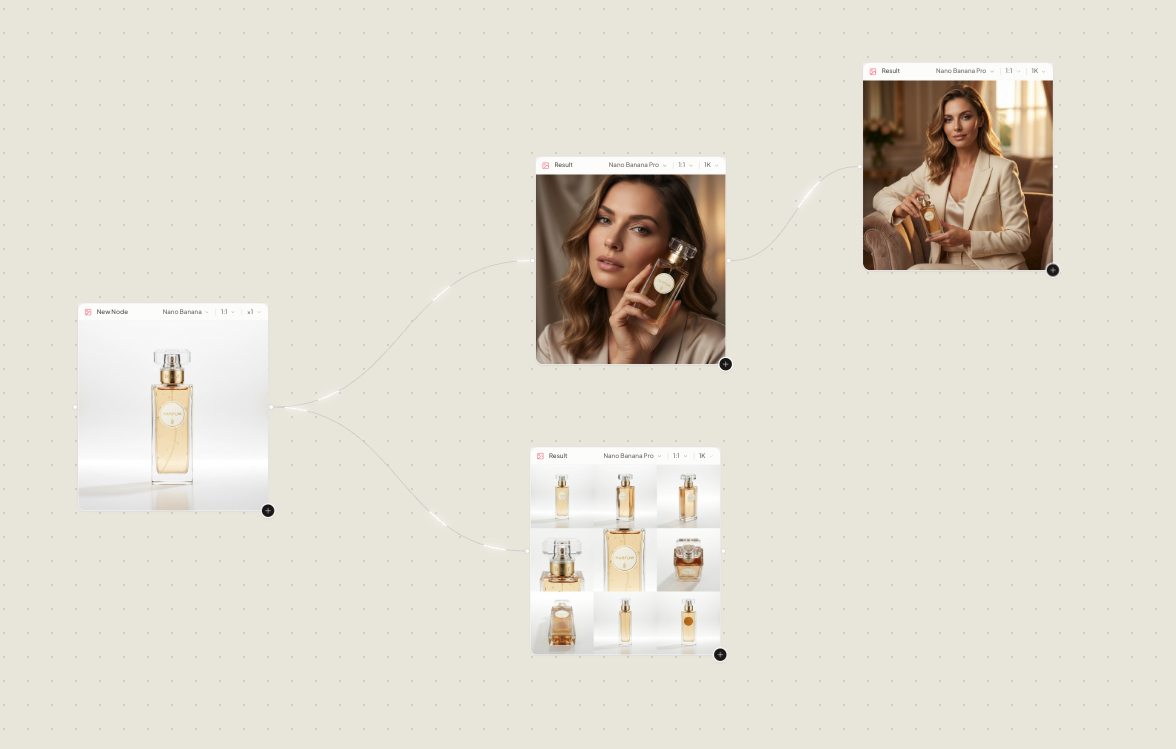
Workspace Pro is a node canvas, not a single prompt box. Drop a product still, connect a generation node, then an assistant. Chain the shoot, branch a variant, keep every version on the graph.

  • Every asset is a nodeStills, prompts, generations, and assistants sit on the canvas as nodes you connect, mute, or rerun.
  • Chain and branchPipe a studio frame into a lookbook node, then split a variant for a second crop, model, or location.
  • The graph travelsThe same node workflow, Brand Kit, and Library on web and iPhone. Same credits.
Workspace Pro node canvas, with stills and generations connected as a workflow

Social Planner

Create it. Schedule it. Publish it.

Move approved visuals from your Lomar Library into one social media calendar. Write the caption, choose a date, review every post, and publish to connected accounts without leaving the studio. The 5 networks shown below support eligible connected accounts; connections are optional and can be disconnected.

InstagramFacebookThreadsPinterestLinkedIn
  • Plan image posts, carousels, Stories, and Pins where supported.
  • Drag scheduled creatives to a new date and keep publishing status visible.
  • Connect or disconnect every social account from one place.
Open Social Planner
Drag to reschedule · Review before publishing Ready to publish

Lomar MCP

Your studio, inside your AI assistant.

Lomar is in Claude’s connector directory. Connect it in Claude to read your Brand DNA and Library and to schedule, move or delete Planner posts just by asking. To generate ads and product photos as well, add the MCP link to Claude, Claude Code or Codex.

According to the official Claude Code documentation and Codex documentation, both assistants support MCP connections.

Active subscription required. Planner is available on Creator plans and above.

Works withMCP

Just ask

“Create a launch visual and schedule it for Friday.”

Powered by LomarCreator + Planner

Also on iPhone

The same studio, in your pocket.

Create social ads, product images, and complete campaigns on the move. Choose a model, translate finished visuals, or plan a post. Same account and credits: start on iPhone, finish at the desk.

According to Lomar’s App Store listing, the app is available for iPhone.

Download on the App Store

Pricing

Pick a plan. Your credits work everywhere.

Every plan opens the full Creator Studio on the web and on iPhone, with one credit balance for both. Start with 6 free images over 3 days.

Free trial

Try Lomar free for 3 days.

Card required. Nothing is charged if you cancel before day 3.

  1. 1 · Today

    6 free images

    Socials, Product img and Campaign, in your Brand DNA.

  2. 2 · Days 1 to 3

    Try every shoot

    Ads, product photos and campaigns. Nothing is charged.

  3. 3 · Day 3

    Starter begins

    $9.99 a month for 100 credits, unless you cancel first.

Start free trial

Starter

3 days free

$9.99/ month

Up to 50 AI images / month

100 credits · ≈ $0.20 per image

Your 100 monthly credits can cover up to 50 generated images at 2 credits per image.

Start free

Card required. Cancel before day 3, pay nothing.

  • Socials, Product img and Campaign
  • Brand DNA from your website
  • Web and iPhone, one account

Creator

Most popular

$29.99/ month

Up to 150 AI images / month

300 credits · ≈ $0.20 per image

Your 300 monthly credits can cover up to 150 generated images at 2 credits per image.

Choose Creator
  • Everything in Starter
  • Lookbook for whole collections
  • Social Planner for five networks

Pro

$49.99/ month

Up to 250 AI images / month

500 credits · ≈ $0.20 per image

Your 500 monthly credits can cover up to 250 generated images at 2 credits per image.

Choose Pro
  • Everything in Creator
  • Lookbook and Social Planner
  • For brands that post every week

Business

$169.99/ month

Up to 1,250 AI images / month

2,500 credits · ≈ $0.14 per image

Your 2,500 monthly credits can cover up to 1,250 generated images at 2 credits per image.

Choose Business
  • Everything in Pro
  • Lookbook and Social Planner
  • For catalogues and agencies at volume
  • Renews monthly, cancel any time
  • One balance on web and iPhone
  • 2 credits per image
  • Top up from $4.99 when you need more

FAQ

Frequently asked questions.

The essentials about product shoots, model casting, Brand DNA, social publishing, mobile access, and credits.

What can I create with Lomar?

Lomar creates social ads, catalogue-ready product photography, and multi-frame editorial campaigns. You can choose a model, translate finished visuals, organize assets in your Library, and schedule approved content in Planner.

What does Lomar need to start a shoot?

Upload a product photo, choose an existing Library asset, or paste a product or shop URL. A URL can build reusable Brand DNA from your logo, colours, typography, and positioning, but it is only one way to start.

Do I need to write prompts or fill in templates?

No. Pick the shoot type, format, and optional cast, and Lomar handles the art direction. You can add a short creative direction when you want more control, but prompt writing is not required.

Can I use real models in my shoots?

Yes. Lomar has 46 faces on permanent call, so you can place the same model across your product shots and campaign frames without casting calls, day rates, or rebooking.

What is Workspace Pro?

Workspace Pro is a node canvas where you connect stills, generation nodes, and assistants to chain and refine an entire shoot, branch variants, and keep every version on the graph.

Is Lomar available on mobile?

Yes. The same studio, Brand Kit, Library, and credits are available on iPhone through the Lomar iOS app, so you can start a shoot on your phone and finish at your desk.

Can Lomar publish to social media?

Yes, through Planner. Connect an eligible Instagram, Facebook, Threads, TikTok, Pinterest, or LinkedIn account, approve a post, and choose when to publish it. Connections are optional and can be disconnected in Lomar. Planner is available on Creator, Pro and Business plans.

What cookies does Lomar use?

Necessary cookies and local storage keep the site, login, and checkout working. Optional cookies for advertising stay off until you allow them in the cookie banner. Your consent choice is valid for up to 365 days. You can reopen Cookie settings from the footer to change it.

How much does Lomar cost, and is there a free trial?

The Starter plan is $9.99 per month and includes a 3-day free trial with 6 images, with no charge if you cancel before day 3. Plans range up to $169.99 per month for higher credit volumes. A card is required for the trial. Starter includes 100 monthly credits for up to 50 images at 2 credits per image. The same credit balance works on web and iPhone, and subscriptions renew monthly with the option to cancel at any time.

How are credits used?

Each generated image or design costs 2 credits. Credits work across both web and iOS, and subscriptions renew monthly with the option to cancel at any time. Starter includes 100 monthly credits, enough for up to 50 images at that rate.

Your product. Your cast. Your campaign.

Bring a product photo, a Library asset or a shop URL. Choose from 3 shoot modes, add your cast and format, and save the finished visuals in your Library.

Start free